Updated November 22, 2026. Competitor details come from each vendor's public pages on that date.
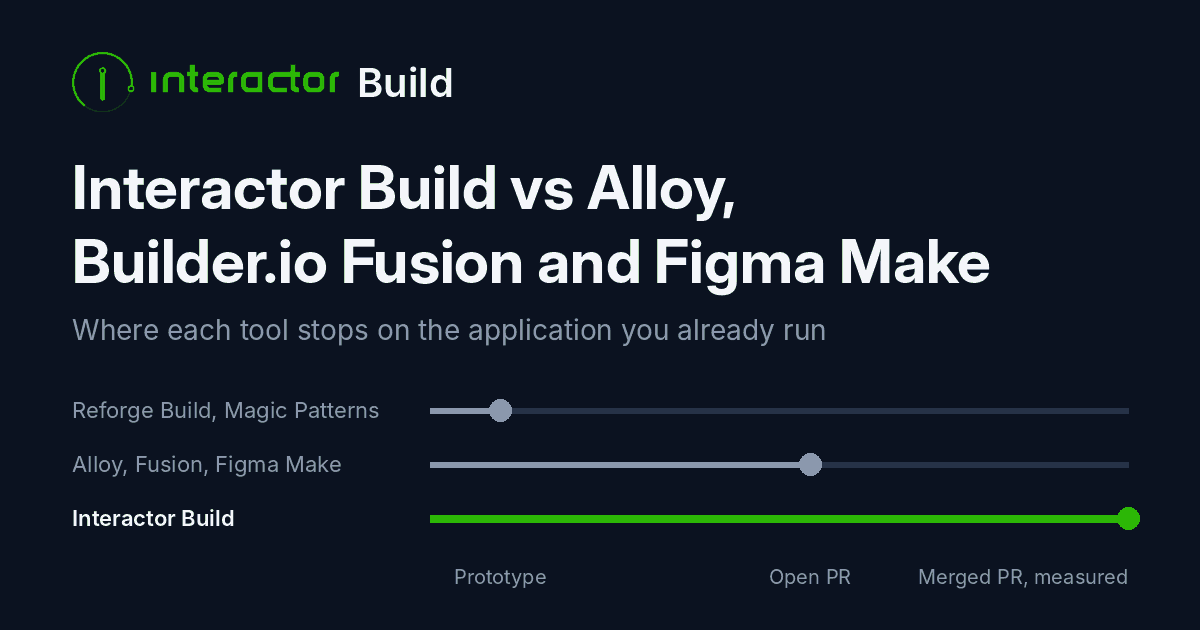
Interactor Build is an AI-native development platform that works on the application you already run. It takes a change from a plain-English spec to a merged pull request, front end and back end, with a person approving each gate. Alloy, Builder.io Fusion, Figma Make, Reforge Build and Magic Patterns were built for prototyping. Two of them never touch your codebase. The three that reach your codebase stop at an open pull request, and Fusion and Figma Make keep the work to the front end.
Why pick Interactor Build for an existing application?
Pick Interactor Build because it does the whole development job on a product that is already live. Many backlog items on a live product are more than a screen. They need an API change, a data change and tests, in the stack the product already uses.
Interactor Build covers that in one flow:
- Plan, the PM playground in Build, lets you try an idea against your live product. You do not need a repo to start.
- An idea worth building becomes a goal with a plain-English spec.
- Build does the work in your existing repo and your existing stack.
- A person approves each gate.
- The goal ends in a merged PR, and Build measures the outcome after release.
Plan is free. Goals are paid. You can start at build.interactor.com.
How does Interactor Build compare with each option?
| Product | Built as | On your existing application | Ends in |
|---|---|---|---|
| Interactor Build | AI-native development platform | Yes. Full stack, in your repo | Merged PR, outcome measured |
| Alloy | AI prototyping tool for PMs. 7,000 users on the Chrome listing | A capture of a live page, or a connected GitHub repo | Prototype, or an open PR |
| Builder.io Fusion | Visual development platform. SOC 2 Type II | Connected repo, front end | Open PR |
| Figma Make with GitHub | Design tool with a codebase beta on Mac | Connected repo, UI work. Backend and API work are out of scope | Open PR |
| Reforge Build (Miro) | PM prototyping, part of Miro since March 2026 | No. Exports a React project | Prototype |
| Magic Patterns | AI prototyping. $20 Starter and $100 Business per seat | No. Syncs to a new GitHub repo | Prototype |
Interactor Build vs Alloy: which should a PM use?
Use Alloy to prototype on top of your product. Use Interactor Build to change the product. Alloy calls itself an AI prototyping tool for product managers, and its Chrome Web Store listing shows 7,000 users. The extension captures a page of your product and turns it into a prototype that matches your design system. A capture is a copy of one page. Your application code is untouched.
Alloy has added codebase sessions on top of that. You connect GitHub, and Alloy says you can "push code and open a pull request in one click" (Y Combinator profile). The session ends when the PR is open.
Interactor Build starts from a spec and works in your repo from the first step. It takes the PR through approval to merge and measures the outcome afterward.
Interactor Build vs Builder.io Fusion: what is the difference?
Fusion works on your front end, and Interactor Build works on the whole application. Fusion is the closest rival. You point it at a Slack thread, a Jira ticket or a PRD, and it builds in your own components and opens a pull request. Builder's app development page describes the work as building in the front end your product already runs on. Builder lists SOC 2 Type II compliance.
Builder publishes its own results. Two of its product managers merged 45 PRs into the production web app in three months, and reviewers accepted 80% of the PRs that PMs and designers wrote.
Fusion also expects a repo before anything else. Builder's launch post tells teams to "start by connecting your repository." In Interactor Build a PM tries the idea in Plan first and connects the repo when the idea is worth building.
Interactor Build vs Figma Make: which fits a PM?
Figma Make fits UI changes that design owns. Interactor Build fits backlog items that need more than UI. Figma added codebase features to Make on May 28, 2026. You import a Git repository into the Figma desktop app, edit the product visually and open a pull request. CMSWire reported the update as a limited beta for Mac desktop users.
Figma's help article for the beta rules out backend and API work, infrastructure changes and native mobile code. Make comes with a Figma Full seat, which VentureBeat put at $16 to $90 per month depending on the plan.
A PM with a backlog item that touches an API cannot finish it in Make. In Interactor Build the same goal covers the UI and the API.
How does Interactor Build compare with Reforge Build and Magic Patterns?
Reforge Build and Magic Patterns do not work on your existing application at all. Miro acquired Reforge on March 24, 2026, and the deal included Reforge's product tools. Miro's help center says Reforge Build users can export a prototype as a React project in a .zip file, or convert it into a Miro prototype. Your engineers then rebuild it in your product.
Magic Patterns sells a $20 Starter and a $100 Business plan per seat (Vendr), and moved to usage credits in March 2026. Its two-way GitHub sync exports your design to a new repository that Magic Patterns creates. Someone still has to move that code into the product you already run.
When is another tool the better choice?
Another tool is the better choice when a prototype is all you need. Alloy's extension or Magic Patterns is enough for a customer demo this week. Figma Make suits a design team that lives in Figma and wants to adjust UI.
We built Interactor Build for small software teams with a live product on GitHub, where a founder or a PM owns the backlog.
So PMs: where does your last prototype live today? In a share link, or in production?